
Amazon reserves the right to suppress the Buy Box for listings that do not offer a positive consumer experience. This can be due to unreasonable pricing, poorly rated sellers, misleading descriptions and more. Click here to learn more about why the buy box may be suppressed.
If the Buy Box has been suppressed, Amazon will display a “See All Buying Options” button in its place as shown in the image below:
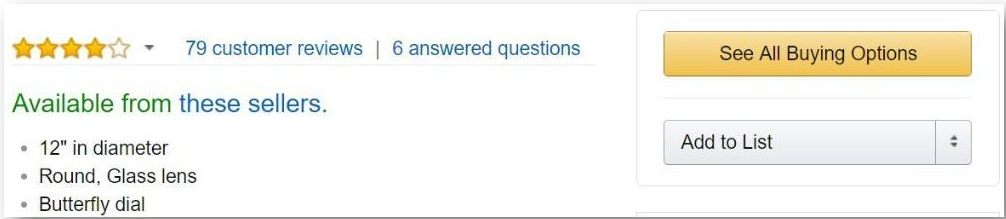
What can be done regarding suppressed buy box listings
Feedvisor automatically recognizes Buy Box suppression in your listings and will begin to gradually reduce the price in small increments at a rate of 2% per iteration (the 2% are configurable).
This logic is implemented to increase the chances of restoring the buy box at the highest possible price. In case the price reaches your floor price and the buy box hasn’t been restored no further reductions will take place and the algorithm will price your listing a cent below the nearest competitor of the same fulfillment method.
Once the Buy Box is restored we will set the price at which the buy box became available as an intermediate ceiling price for 1 day (Configurable value), in order to avoid suppressing the buy box again. If the buy box remains unsuppressed for 1 days the intermediate ceiling price will automatically be removed.
How to activate the Avoid Suppressed Buy Box feature
This feature is enabled by default in all Feedvisor accounts. If you wish to disable it please contact Support@Feedvisor.com
How to locate Buy Box suppressed items from the dashboard
-
Under the Analytics tab Click on the Revenue sub-tab
-
Click on the Export button (located on the lower right side of the screen)
-
In the Excel file turn on filtering on the sheet
-
in column B (Tags) filter the tag BuyBoxSuppressed
Comments
0 comments
Please sign in to leave a comment.