
The Amazon Buy Box usually appears at the top right corner of a listing page. However, for some listings, the Buy Box is replaced with a “See All Buying Options” button – this means that the Buy Box has been suppressed (For New listings only).
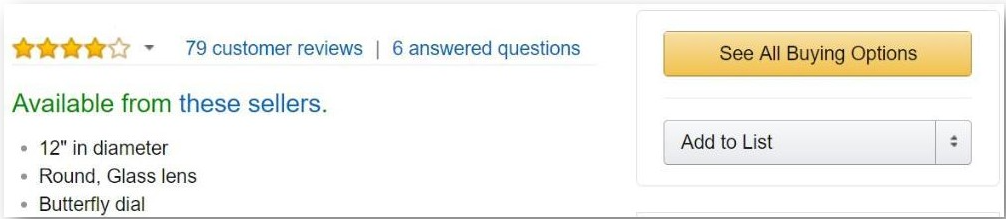
Amazon reserves the right to disable the Buy Box for some listings, or remove the ‘New Buy Box’ and opt for the ‘Used Buy Box' for some listings.
Why is the Buy Box suppressed then? There could be several reasons; below are the primary explanations for this scenario:
- Price is either too high or too low
One of the main causes of Buy Box suppression is the current landed price is much higher than the MSRP (RRP).
Amazon’s approach is always oriented towards the consumer, and if an ASIN violates a preset rule for pricing for a specific ASIN, Amazon will often suppress the Buy Box since it believes that the available offers are not competitive enough to attract buyers.
While such products are available for purchase, the velocity of sales is often reduced due to the lack of Buy Box.
In order to leverage this scenario, you can use the Buy Box suppression to sell certain items at a much higher landed price than the Marketplace price.
You can also alter your price range to attempt to restore the Buy Box share (usually by lowering the item price). - Sellers are not eligible to win the Buy Box
In order for a merchant to achieve a share of the Buy Box, they must meet certain criteria, which include, but are not limited to:
· A Professional Seller Account
· A low Order Defect Rate (ODR), A-Z Guarantee Claims, and Chargebacks
· A decent score on other seller performance metrics (Read in Depth: The Buy Box Cheat-Sheet, part of the Buy Box Bible)
· Offering a positive customer shopping experience: fast delivery and shipping options (Amazon Prime), good price, customer service (Included in FBA items)
· Time and experience on the Amazon selling platform, e.g. selling on Amazon for at least 2 months
Amazon takes many variables into consideration when granting the Buy Box Share to merchants. However, if Amazon detects that no seller on the offer listing page is capable of providing a positive customer shopping experience, they will suppress the Buy Box altogether. New merchants, merchants with bad feedback scores or high return rates may be responsible for suppressing the Buy Box. Of course, at any time a reputable, experienced seller (with the metrics to vouch for it) can slide into the competition and dominate the Buy Box for this offer page. - No description or incomplete/inaccurate description; missing image
As stated earlier, Amazon’s approach is always consumer-oriented. With that in mind, listings that do not include a description, have inaccurate information, and/or are missing a product image will most likely have a suppressed Buy Box, since Amazon believes that this may hurt the consumer’s shopping experience.
Buy Box Suppression – for books and media categories
One more thing about Buy Box Suppression – for books and media categories, the situation is a bit different.
Amazon considers itself a merchant with perfect metrics. As such, in the books category, if Amazon offers an item, they will always win the Buy Box.
If the Buy Box is suppressed in a book listing, it simply means that Amazon is not selling this specific book. As long as Amazon is selling this item, you will not be able to achieve a Buy Box share.
For other media products such as music, DVDs, Blu-ray and such, only sellers using FBA will be eligible for the Buy Box. A suppressed Buy Box in these categories might mean that Amazon is not directly selling the product itself, and no other FBA sellers are offering the product. This is another great opportunity to transform a suppressed Buy Box into a great opportunity.
Comments
0 comments
Please sign in to leave a comment.